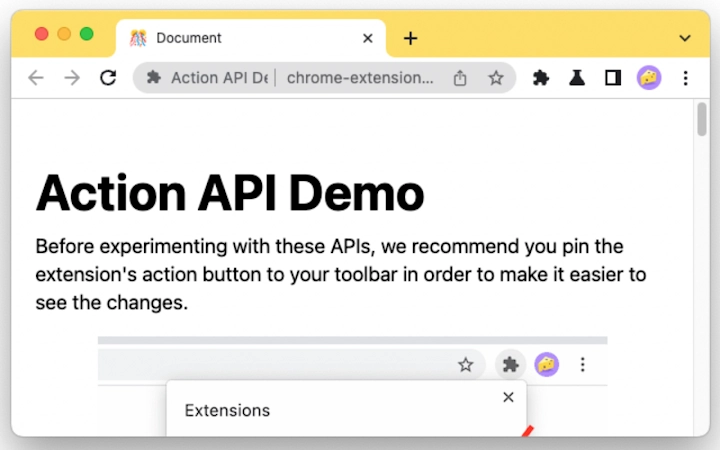

Chrome Extension for Action API Learning
The Chrome extension demonstrates foundational use of the Action API, a core component of the Chrome Extensions platform. Designed primarily for developers, it serves as a practical example for understanding how to interact with browser actions programmatically. This tool helps users explore the behavior of extension actions, such as badge text, icons, and popup interactions, within a controlled environment. It is particularly useful for those learning or experimenting with extension development, offering a minimal yet functional implementation of the Action API. The extension supports real-world scenarios such as debugging action behaviors, testing user interface responses, and validating how actions integrate with other extension components. It is not intended for end-users seeking browser functionality, but rather for developers aiming to deepen their understanding of Chrome's extension architecture. The developer did not provide additional background information beyond the extension’s purpose.
Key Features & Capabilities
- Action API Implementation: Demonstrates how to use the Action API to programmatically set badge text, icons, and popup content, providing a hands-on example of API integration.
- Interactive Badge Management: Allows users to update badge text dynamically, illustrating how to display status indicators or counters within the browser toolbar.
- Icon Customization: Enables real-time changes to the extension’s icon, helping developers visualize how icon updates affect user perception and interface clarity.
- Popup Interaction Testing: Offers a simple popup interface to simulate user interactions, useful for testing event handling and UI responsiveness during development.
- Source Code Accessibility: The full implementation is publicly available on GitHub, allowing developers to study, modify, and extend the code for educational or project-specific use.
These features support a range of development workflows, including API experimentation, UI testing, and debugging. For example, a developer can use this extension to verify how badge updates propagate across different browser states or test icon transitions during runtime. The open-source nature of the project enhances its utility as a learning tool, enabling collaboration and iterative improvement. Real-world usage includes onboarding new team members to extension development or creating templates for future projects. The extension’s minimal design ensures focus on core functionality without unnecessary complexity.
User Interface, Workflow & Performance
The user interface is intentionally simple, reflecting its educational purpose. The extension appears as a small icon in the Chrome toolbar, with a popup window that displays basic controls for modifying badge text and icons. Navigation is straightforward, requiring minimal interaction to access core features. The workflow is linear: users access the popup, make changes, and observe the results in real time. This design supports efficient learning and testing without distractions. Performance is not explicitly detailed by the developer, but the lightweight nature of the extension—1.5 MB in size—suggests minimal impact on browser resource usage. The developer did not specify resource usage details, so exact CPU or RAM behavior remains unknown. Stability is expected to be high, given the extension’s small codebase and focus on a single API. No reports of crashes or performance degradation were provided. General software behavior patterns suggest consistent operation under normal conditions.
Compatibility & System Requirements
The extension is compatible with Windows, Mac, and Linux operating systems, supporting the latest versions of Google Chrome. The software version is 1.0, released on January 15, 2024. The installation size is 1.5 MB, which is compact for a development tool. Exact system requirements were not listed, so users should ensure their device meets standard Chrome extension prerequisites. Compatibility information was partially provided, with no mention of older Chrome versions or alternative browsers. The developer did not specify hardware requirements, so performance may vary depending on system configuration. For developers, the extension is expected to function across typical modern computing environments, provided Chrome is up to date.
Pros and Cons
Pros
- Free to use and distribute, ideal for learning and experimentation.
- Lightweight at 1.5 MB, minimizing storage and performance impact.
- Open-source with full access to the codebase on GitHub.
- Directly demonstrates core Action API functionality for developers.
- Simple, focused interface suitable for educational purposes.
Cons
- Not intended for end-users; limited practical use outside of development.
- No advanced features or customization options beyond basic API testing.
- No official support or documentation beyond the GitHub repository.
- Compatibility with older Chrome versions is unconfirmed.
- Limited to Chrome browser; not available for other platforms.
FAQ Section
Is this extension compatible with all Chrome versions?
Compatibility information was not fully specified. It is recommended to use the latest version of Chrome for optimal performance.
Can I use this extension offline?
Yes, the extension functions without an internet connection once installed, as it does not require external resources.
Is the source code available for modification?
Yes, the complete source code is hosted on GitHub and can be accessed, forked, or modified for personal or project use.
Does this extension collect user data?
The developer did not provide information about data collection. As a learning tool, it is designed to be minimal and does not appear to include telemetry or tracking features.
How often is the extension updated?
Update frequency is not specified. Users should check the GitHub repository for the latest changes and version history.
Final Thoughts + CTA
This Chrome extension serves as a clear, focused educational tool for developers exploring the Action API. Its minimal design, open-source foundation, and practical implementation make it a valuable resource for learning extension development fundamentals. While it lacks advanced features and is not suited for general browsing, it excels in its intended role: demonstrating core API behavior. The free availability, small footprint, and accessible codebase enhance its appeal for both beginners and experienced developers. For anyone interested in building Chrome extensions, this tool provides a reliable starting point. Download Chrome Extension for Action API Learning now.







